
Amazon Integration
Testing Amazon SP-API Calls in Sandbox Before They Touch Business Central
D365 Zone Services · Sep 10, 2026
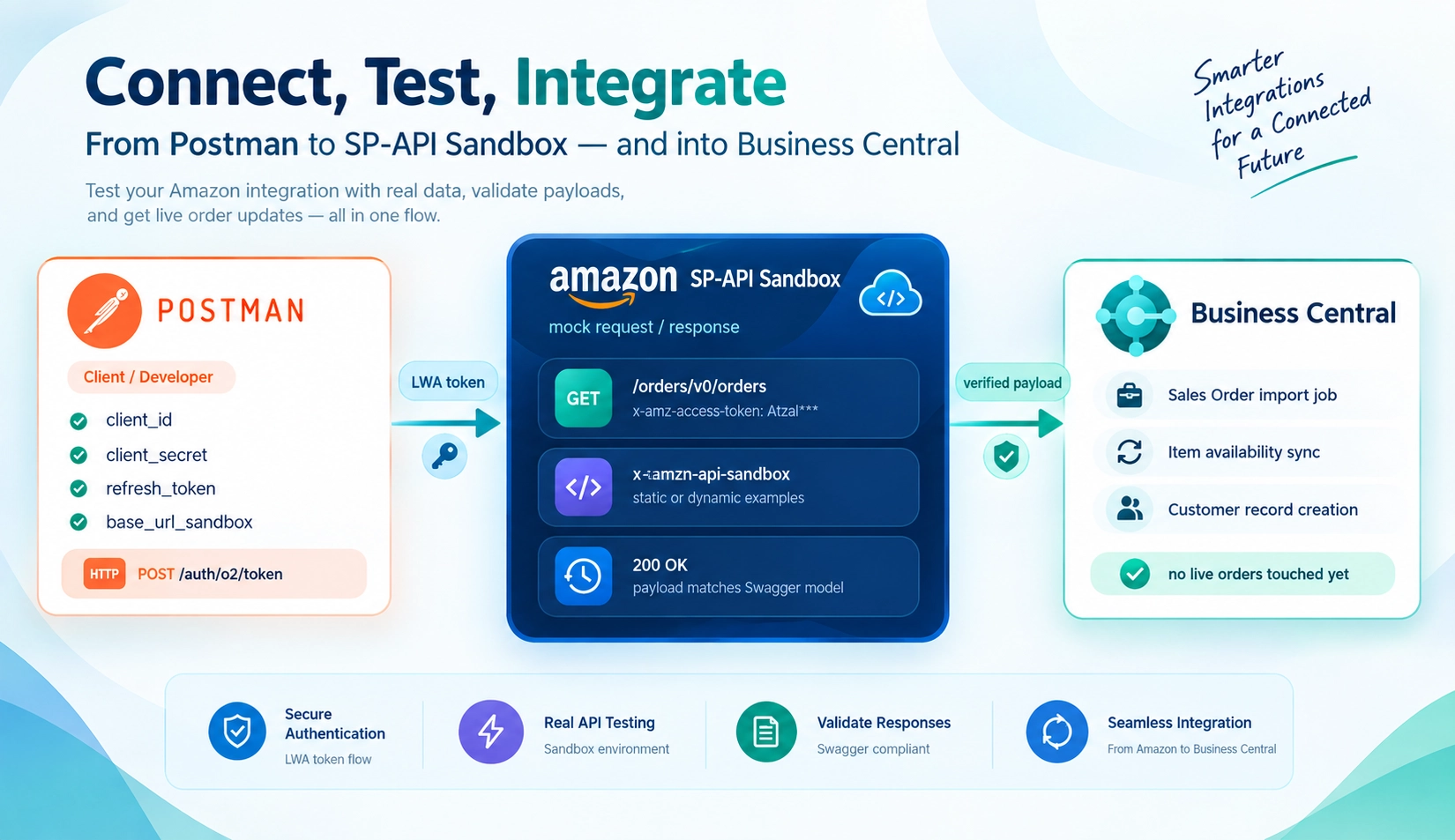
Before connecting Amazon to Business Central with live data, it is worth testing the integration against Amazon's Selling Partner API sandbox. The sandbox uses test data instead of real inventory, orders, and pricing, so nothing is shipped, posted, or changed.
It gives your team a safe way to verify authentication, review API payloads, catch field-mapping errors, and test error handling before production.
- Practice the full authentication flow without a production seller account
- Review payloads before mapping them to Business Central
- Catch mistakes in your field mapping early
- Test your error handling logic against imaginary orders
What the Sandbox Actually Lets You Do
Amazon provides static and dynamic sandbox environments. Static calls return fixed request and response examples, making them useful for testing payload parsing. Dynamic calls retain limited state and respond to previous requests, making them better for testing order-processing logic.
What You Need to Test Your Setup in Postman
For a Postman test, register an application in the Amazon Solution Provider Portal and collect these values:
client_id           — generated when you registered your application
client_secret       — also generated with your application, and something you definitely want to keep secure
refresh_token       — obtained when authorizing your application with a seller account
base_url_sandbox    — the base URL for the region you are targeting, with the sandbox suffix
A sandbox application can provide the credentials needed to begin testing before a production seller account is authorized.
Step 1: Obtain an LWA Access Token
Use the client ID, client secret, and refresh token to request a Login with Amazon access token from the oauth/token endpoint. The token lasts for one hour and is required for SP-API requests.
{
  "access_token": "Atza|IwEBIA...",
  "token_type": "bearer",
  "expires_in": 3600
}
Your Business Central integration will need to repeat this authentication flow when its background jobs connect to Amazon. The production version uses a different base URL.
Step 2: Make a Sandbox API Call
Start with the Orders API. Point the base URL to your regional sandbox, then send a GET request to /orders/v0/orders with the access token in the header:
GET /orders/v0/orders
x-amz-access-token: {{access_token}}
Use the response to verify order status, marketplace, customer, and line-item mappings before sending data into Business Central.
Restricted Data Needs a Different Token
Customer addresses and other personally identifiable information are restricted data. If Business Central needs this information, request a restricted data token with the createRestrictedDataToken operation before processing customer details.
Where This All Fits Into Getting Your BC App Built
Sandbox testing does not replace a final production check, but it catches authentication, mapping, and processing errors early. It is a practical first step when building an Amazon-to-Business Central connection.
Once the order, inventory, and customer workflows pass with test data, the same background jobs can be prepared for production.
A Couple of Frequently Asked Questions
Do I need a seller account to start working on the Business Central side of the integration?
Not necessarily. A sandbox testing application can provide credentials to begin developing and testing the Business Central side first.
Can I use the sandbox to test rate limits and throttling?
No. Use the sandbox to test correctness and payload handling, not production performance or rate limits.
Getting It All Set Up Right
Testing in the sandbox is a quick way to validate an Amazon-to-Business Central connection before it handles live orders. If you need help setting up the integration, contact our team.
D365 Zone Services
Microsoft Dynamics 365 Business Central implementation, integration, migration and support.
- UAE Office: Office 1406, Vision Tower, Business Bay, Dubai
- USA Office: InCorp Services, Inc., 55 W 14th St, Ste 101, Helena, MT 59601
- Email: sales@d365zone.com
- Phone: +1 (707) 731-6403
Areas served: United States, United Kingdom, France, United Arab Emirates, Saudi Arabia, Australia, Netherlands, Canada, Ireland, Germany, Belgium, Switzerland, Luxembourg, Sweden, Norway, Denmark, Qatar, Kuwait, Bahrain, New Zealand, Singapore
Keep Reading
- Amazon Integration for Business Central — Sync Amazon orders, inventory, fees, and fulfillment with Business Central.
- Amazon's External Fulfillment Shipping API — Manage self-fulfilled Amazon orders and shipment updates from your ERP.
- Amazon FBA Integration with Business Central — Why FBA orders, fees, and refunds belong in your ERP.
- Business Central Integration Services — Connect Business Central to your stores, marketplaces, banks, and tools.