
Business Central
Managing Bundles and Kits in Dynamics 365 Business Central
D365 Zone Services · Sep 1, 2026
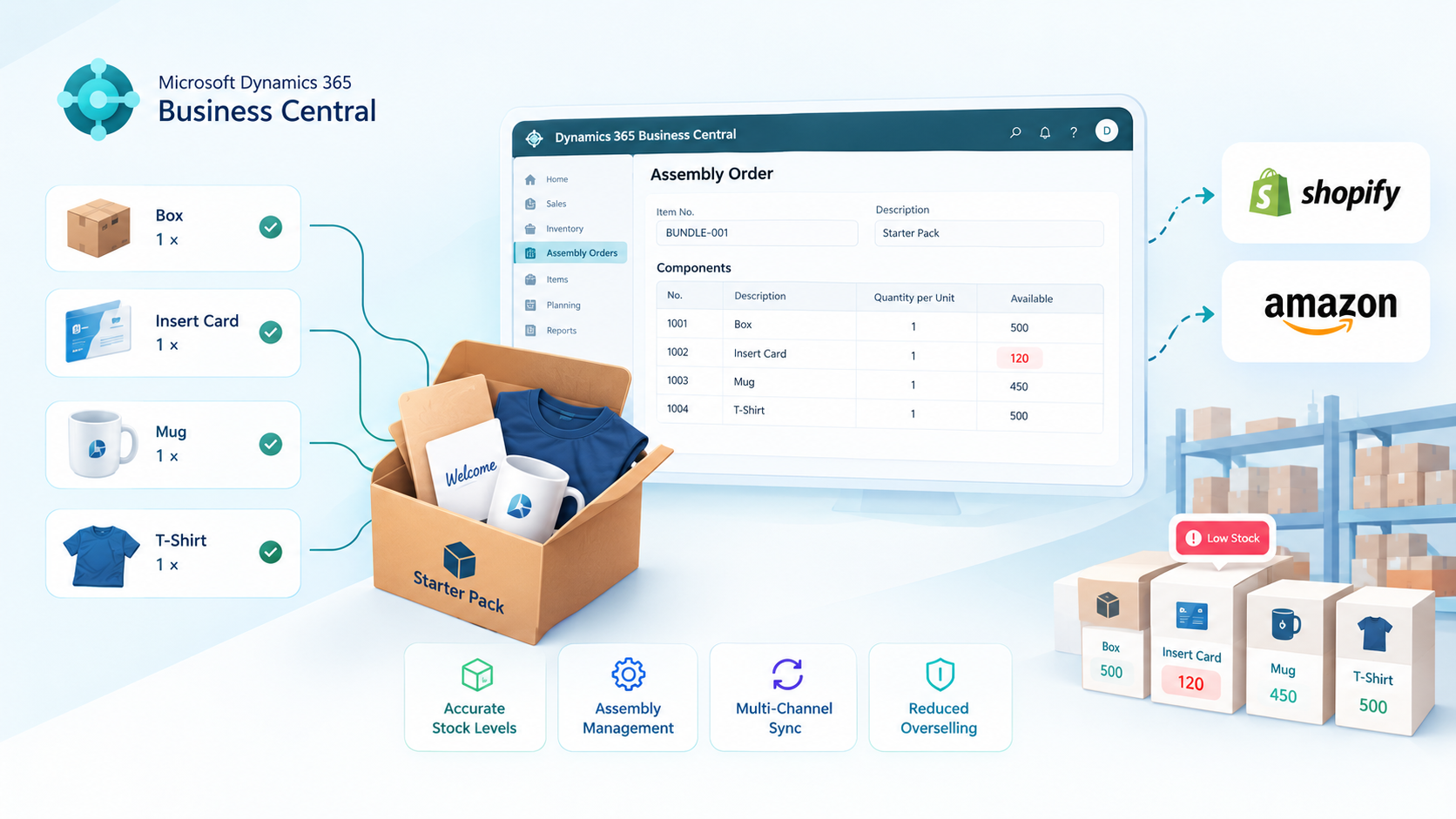
A bundle looks like one product on the screen. It isn't. The moment it sells, several separate stock records need to move at once and if your system only knows about the bundle SKU, not what's actually inside it, you'll keep selling long after you've run out of the one component that mattered.
We've had clients find this out the expensive way: a "Starter Pack" showing 80 units available, right up until a warehouse team member notices the branded insert card ran out three days earlier. Nobody had told the system the insert was part of the bundle, so nothing stopped it from selling.
Business Central actually has a proper answer to this Assembly Management and most of the businesses we work with are either not using it at all, or using half of it. Here's how it's meant to work.
The Part Everyone Gets Wrong
A bundle's real availability is set by whichever component has the least stock — not by whatever number is sitting on the bundle's own item card. Sell the last unit of your lowest-stock component and the bundle is finished, no matter how much of everything else you're holding.
Most systems don't catch this on their own. A sale against a bundle SKU is just one transaction to them they have no idea it should really be three or four transactions against three or four different items. Business Central can handle this correctly, but only if the bundle is actually set up as an assembly, not just a plain item you've labelled as a kit.
Assemble-to-Order or Assemble-to-Stock
Business Central gives you two ways to build a bundle, and picking the right one matters more than most setup guides let on.
Assemble-to-Order puts the components together at the point of sale. Nothing gets physically combined until an order actually calls for it the components sit in stock as themselves right up until that moment. This suits low-volume, made-to-order kits, or bundles where the contents change often enough that pre-building them would mean constantly re-doing finished stock.
Assemble-to-Stock is the opposite: you run assembly orders ahead of demand, turning components into finished bundle stock in batches, and the bundle then sits on the shelf as its own item ready to ship. This is the better fit once you're shipping the same bundle often enough that picking four separate components per order becomes the bottleneck.
- Low, unpredictable bundle volume → Assemble-to-Order
- Steady, repeat demand for the same bundle → Assemble-to-Stock
- Frequently changing bundle contents → Assemble-to-Order
- Multi-component picking slowing down fulfillment → Assemble-to-Stock
Where the Assembly BOM Comes In
The Assembly BOM is what actually ties a bundle item to its components in Business Central it's the line-by-line list of what goes into one unit of the bundle, and in what quantity. Skip it, or get it wrong, and depletion simply won't happen correctly.
A few things worth getting right from the start: every component needs its own item card if it isn't a tracked item, Business Central has no way to deplete its stock. Quantities on the BOM need to be exact, not "close enough" a bundle containing two units of a component has to say 2, not 1. And if the same component feeds into several different bundles, you need to look at combined demand across all of them when you're deciding on reorder points, not just the sales history of your best-selling kit.
This is also where forecasting gets more useful than people expect. Business Central can show you component-level demand pulled from every bundle drawing on that component, which is the only way to avoid under-ordering a part that looks quiet on its own but is actually feeding four different kits.
Keeping Bundle Stock Accurate on Shopify and Amazon
This is where most of the actual damage happens. Business Central can track a bundle's assembly perfectly and still show the wrong number online, if the connection to your sales channels isn't built to keep up.
The setup that works: Business Central stays the single source of truth, and every channel reads from it rather than keeping its own separate count. If you're already syncing orders and stock through our Shopify integration or our Amazon integration, the same principle applies to bundles specifically availability needs to sync at the component level, not just push the bundle's headline stock number out to each channel on its own schedule.
A batch sync every few hours is fine for slow-moving items. It's not fine for a bundle sharing a component across two channels that both sell quickly that's exactly the setup that oversells first. If that's your situation, real-time, event-driven sync stops being a nice-to-have.
Handling Returned Bundles
Bundle returns need a decision most businesses never actually write down: when one comes back, do the components go back into stock individually, or does the bundle get reassembled and restocked as itself?
Neither happens automatically, and the easy shortcut logging the return only against the bundle item without touching its components quietly creates stock that exists on paper but not on the shelf. For an assemble-to-order bundle, return the components as themselves, since the bundle was never a physical unit to begin with. For an assemble-to-stock bundle that comes back sealed, restock it as-is; if it's been opened, break it back down into components and adjust for anything that's no longer sellable.
A Couple of Questions We Get Asked Often
Does Business Central handle bundle stock automatically once it's set up?
Once a bundle is properly configured as an assembly with a correct BOM, yes Business Central will deplete component stock at the right point (assembly for Assemble-to-Stock, order fulfillment for Assemble-to-Order) without manual stock adjustments. The setup work is what most businesses skip, not the ongoing tracking.
Can the same component be used in more than one bundle?
Yes, and it's common. The important part is watching combined demand across every bundle that uses it, not just treating each bundle's reorder point in isolation otherwise a shared component becomes the silent bottleneck across several products at once.
Getting the Setup Right the First Time
Most of the bundle problems we get called in to fix aren't Business Central limitations they're a bundle that was set up as a plain item instead of a proper assembly, with no BOM behind it, syncing to sales channels on a schedule that made sense before the product line grew. If your bundles are already outgrowing a manual or spreadsheet-backed setup, it's worth fixing before a busy season finds the gap for you.
If you want a hand getting Assembly Management, your BOMs, and your channel sync set up properly, get in touch — it's exactly the kind of Business Central work we do daily.
D365 Zone Services
Microsoft Dynamics 365 Business Central implementation, integration, migration and support.
- UAE Office: Office 1406, Vision Tower, Business Bay, Dubai
- USA Office: InCorp Services, Inc., 55 W 14th St, Ste 101, Helena, MT 59601
- Email: sales@d365zone.com
- Phone: +1 (707) 731-6403
Areas served: United States, United Kingdom, France, United Arab Emirates, Saudi Arabia, Australia, Netherlands, Canada, Ireland, Germany, Belgium, Switzerland, Luxembourg, Sweden, Norway, Denmark, Qatar, Kuwait, Bahrain, New Zealand, Singapore
Keep Reading
- Shopify Integration for Business Central — Keep Shopify orders, customers, and stock in step with your ERP.
- Amazon Integration for Business Central — Sync Amazon orders, inventory, fees, and fulfillment with Business Central.
- Shopify Integration with Business Central — Pre-built connector vs. custom build: what syncs and when to choose which.
- Amazon FBA vs FBM: What Is the Difference? — How the two fulfillment programs compare for cost, control, and accounting.
- Business Central Integration Services — Connect Business Central to your stores, marketplaces, banks, and tools.